
Products / ProofRunner
Invite-only
Know the challenge rules before they break your account.
ProofRunner is a guided workflow for funded-challenge traders: choose a firm's rule set, replay a strategy against it, bring in your account or statements, and get warned before a limit breaks. It is a safety and tracking layer around the platform you already use, not a trading platform or a broker. Access is by invitation.
- Invitation only
- Free: simulator, rule library, failure autopsy, cost tracker
- Pro: live guardian, journal, alerts
- Demo-only orders
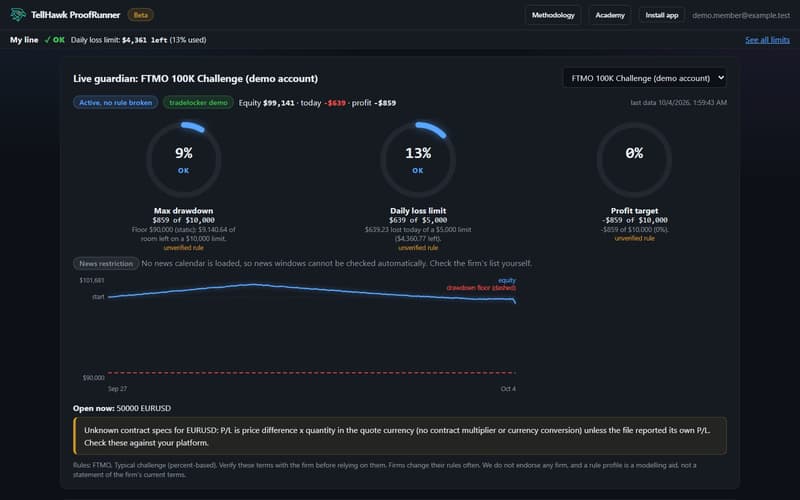
The live guardian (Pro) for a demo account: how much of each limit is used right now. Demo data: a made-up member and synthetic prices, not a real account or result.
What it is
ProofRunner, explained.
ProofRunner walks you through five steps: pick your firm and rules, simulate, connect a demo account or import a statement, run it guarded, and track the challenge. It has two modes: challenge (the evaluation, with a profit target) and funded (the account after you pass, where the aim is to stay inside the rules). The rule library covers FX and futures firms, every rule set can be edited, and every field shows how sure we are of it and when it was last checked.
The free tier includes the Challenge Simulator, the rule library and the failure autopsy. Statement import is free. The Pro features (live guardian, journal and consistency report, alerts and demo automation) are priced when invites open. ProofRunner can be installed as an app on your phone or computer. It is not affiliated with or endorsed by any prop firm, broker or trading platform; firms are named only to describe the rule sets it models.
Who it is for
Challenge candidates
You want to know, before paying for an attempt, whether a strategy could reach the target inside the limits, and how it would have failed.
Funded traders
You are past the evaluation and want a second pair of eyes on daily loss, drawdown and consistency, so one bad day does not close the account.
Futures and FX traders
You trade futures or FX on a platform of your choice and want one place to compare firms' rules and track your own account against them.
Key features
What it does today.
A rule library for FX and futures firms
Compare rule sets side by side, or build your own. Each field is marked confirmed or unverified, with the date it was last checked and a reminder to verify with the firm.
- Futures (73 rule sets): Topstep, Apex, Tradeify, Take Profit Trader, Lucid Trading and My Funded Futures have most fields read from the firms' own public pages, with a few fields still marked unverified; ATF is an empty placeholder for you to fill in
- FX (8 rule sets): FTMO and FundedNext are read from each firm's own pages and The5ers is unverified; each is editable
- Every rule set can be copied and edited, so your own account's terms win over ours
- Firms change their rules. Treat the library as a starting point and check the firm's current terms
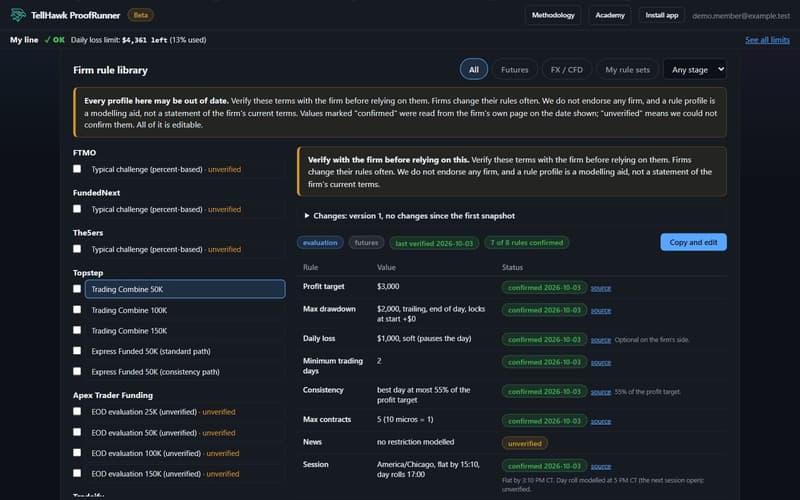
The rule library, showing Topstep's Combine 50K with every field marked confirmed or unverified. Demo data: a made-up member and synthetic prices, not a real account or result.
Challenge Simulator (free)
Pick a strategy and a rule set, then replay the challenge two ways: from every historical start date and from thousands of seeded resamples of the trades. See the share of runs that passed, the share that breached each rule, and how deep the account dipped.
- Strategies: moving-average crossover or RSI mean reversion; 1, 3, 5 or 10 years of history
- Every result opens with a Read this first box rating sample confidence and listing the limits
- Futures price history is not available yet, so the simulator says that plainly for futures rule sets instead of guessing
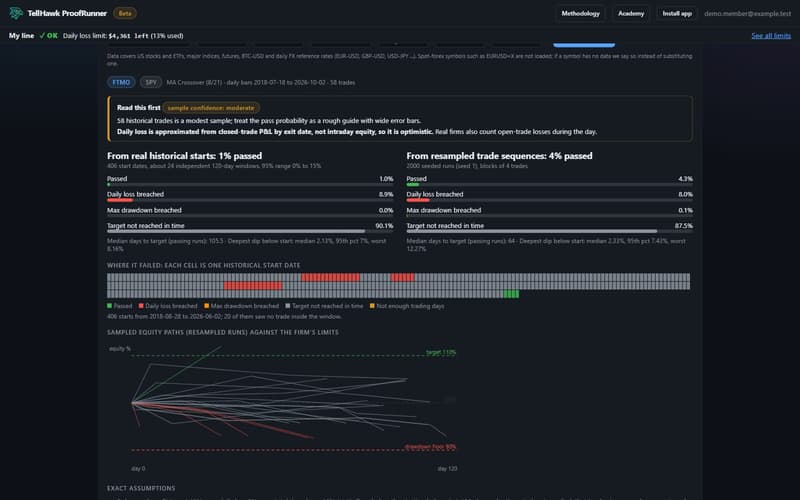
A simulator run: 58 trades, 1% passed from historical starts and 4% from resampled sequences, with the sample-size warning shown first. Demo data: a made-up member and synthetic prices, not a real account or result.
Failure autopsy and what-if replay (free)
For a challenge you track, see which rule broke and when, and which trades contributed. A what-if replay then re-runs your closed trades at smaller sizes to show whether the rule would still have broken.
- Built from closed trades only, so open-trade swings are not reflected
- A what-if is a look back at past trades, not a prediction
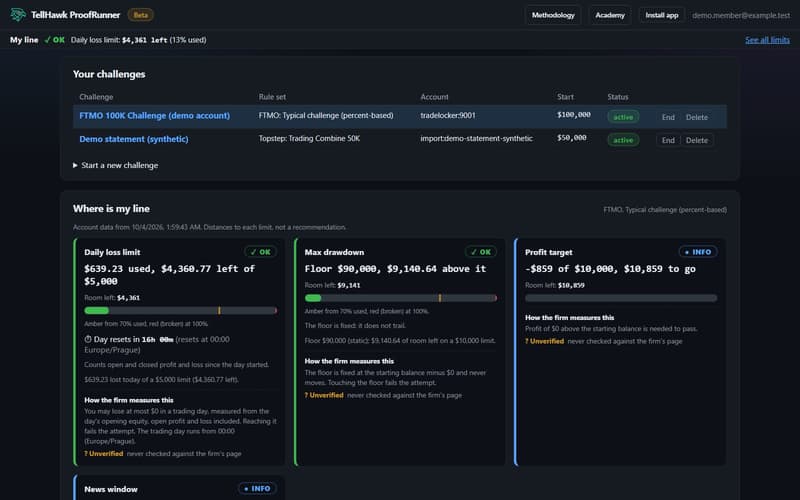
Tracking challenges: each one is a rule set applied to an account or an imported statement. Demo data: a made-up member and synthetic prices, not a real account or result.
Live guardian and trade checker (Pro)
Before you take a trade, the checker tests it against your rules: how much room is left under the daily loss, the drawdown and the contract limit. It warns you as a limit gets close.
- Starter strategies show a signal and propose an order; you decide whether to send it
- On live accounts it only warns. ProofRunner never places a live order
The live guardian (Pro) for a demo account: how much of each limit is used right now. Demo data: a made-up member and synthetic prices, not a real account or result.
Journal and consistency report (Pro)
Every trade in one journal, with a consistency report for firms that cap how much one day can contribute, and a CSV export to keep your own records.
- Consistency is checked against the rule set you chose
- CSV export of the journal
Statement import (free)
Bring your account in without a live connection. Upload a CSV or Excel export and ProofRunner rebuilds the trades and runs the same rule checks.
- Presets for common export layouts, plus a generic column mapping for any other file
- A preset is a convenience: check the result against your platform before relying on it
- Imported statements are read-only history; no order can be sent to them
Alerts (Pro)
Get told before a limit breaks, wherever you are looking.
- In the app: a banner and a sound
- Browser notifications while the app is open
- Telegram or Discord, using your own bot or webhook, so messages go to a channel you control
Demo-only orders, behind a gate (Pro)
With a connected demo account, an order has to clear the pre-trade risk check and the rule guardian before it is queued. Each decision is logged with its reason.
- Demo accounts only by default; live order placement is off by default and unverified
- A queued order expires if your connection does not pick it up promptly
- Starter-strategy signals (free) only propose an order. Nothing is sent unattended
Simulate from your own trades (free)
Instead of a starter strategy, replay the closed trades from a statement you imported against a rule set, and compare how well each firm's rules would have fitted the way you actually trade.
- Built from closed trades only, read from an account you imported, and nothing is written or sent anywhere
- A fit comparison across rule sets, with the same Read this first warnings about small samples
- It describes your past trades under a firm's rules; it is not a forecast of a future challenge
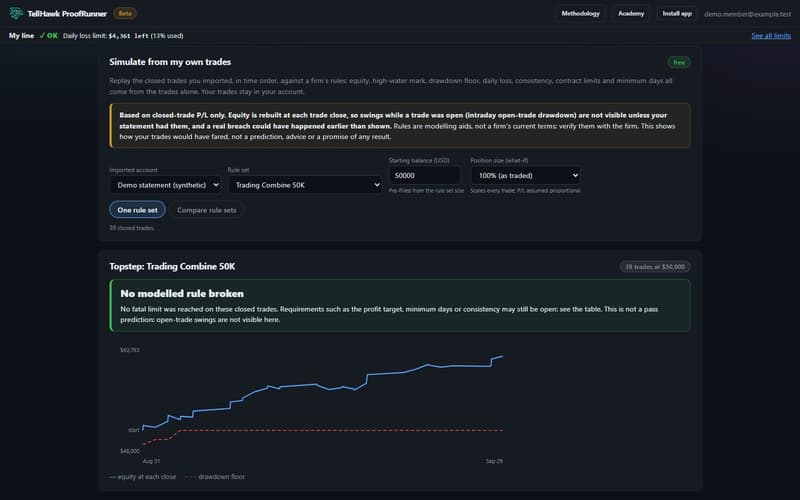
Own trades replayed against one firm's rules, with the closed-trade caveat above the result. Demo data: a made-up member and synthetic prices, not a real account or result.
Rule changes you can follow (free)
Firms change their rules without notice. The rule library keeps a change log, shows when each firm was last checked, and lets you follow the firms you care about.
- A Changes list for each firm, and a last-verified badge that warns when a check is getting old
- Follow a firm to get a bell and a banner when its rule set changes or goes stale
- We publish a change only after staging it with its source and date, and record when a firm was re-checked and nothing had changed
Behaviour flags and a cost and ROI tracker (free)
Two tools for looking at your own habits and your own spending, in neutral terms.
- Behaviour flags describe patterns in your own closed trades, with the evidence. They are descriptive, not advice, and they say nothing about whether a trade was right. Change the thresholds, snooze or dismiss any of them; optional alerts to Telegram or Discord are Pro
- Cost and ROI tracker: record challenge fees, resets and payouts by hand, see totals and a running net for each currency, and import or export CSV. Free keeps up to 50 records; Pro has no plan limit. There is no bank link and no currency conversion
Where is my line (Pro)
An always-visible panel showing how much room is left under each rule, with the firm's own definition of that rule beside it.
- Each state is written in words as well as colour
- It reads the live account status, which is part of ProofRunner Pro. The failure autopsy stays free
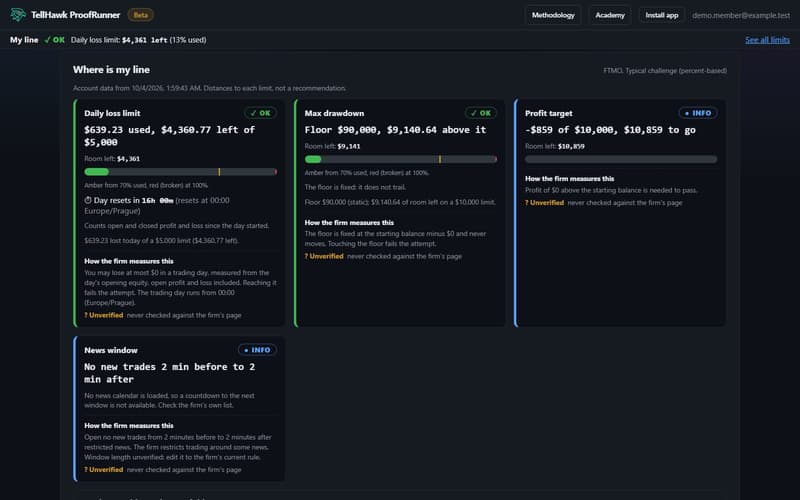
Where is my line (Pro): the room left under each rule, with the firm's definition beside it. Demo data: a made-up member and synthetic prices, not a real account or result.
Connect a platform
One screen to pair a platform connector to your account with a short-lived pairing code, follow the install steps, and see the connector's live status.
- Pairing codes are single-use and short-lived
- One FX/CFD platform connector is rolling out, two more FX/CFD platform connectors are coming, and a read-only futures platform add-on is coming. The futures add-on has been tested against a simulator only and has not yet been tried in a real platform, so it is not offered to customers
- Futures accounts are tracked by statement import today
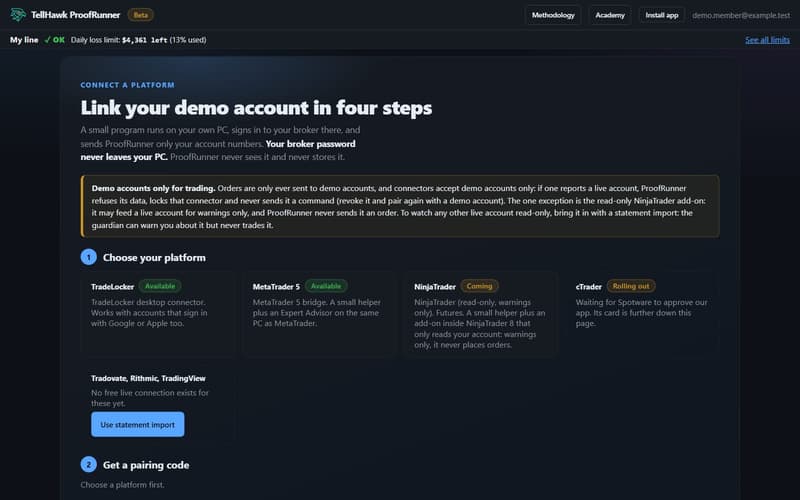
Connecting a platform. Status labels show what is available today and what is still coming. Demo data: a made-up member and synthetic prices, not a real account or result.
The ProofRunner Academy
37 modules and 161 lessons across three levels, with 34 hands-on labs, on challenge rules, risk budgets, drawdown, consistency, records and avoiding scams.
- Free: a small taster (currently 3 modules) with practice quizzes. Pro: every lesson, lab, exam and certificate
- Certificates carry a credential ID that anyone can check on tellhawk.com/verify. They are educational, not a qualification, and say nothing about trading performance or any prop firm
- Lessons load as you open them instead of the whole catalogue downloading first. A lesson can carry callouts, worked examples you expand, short self-checks and tooltip definitions of terms. Practice quizzes show one question at a time, with an explanation, a flag, and a review of the ones you missed; some practice questions have step-by-step hints (not every question does). Exams show a timer, keep your place if the page reloads, and end with a results page that points to what to study next.
- Inside the Academy you can rate a lesson, report a problem with it, and ask the TellHawk team a question. Pro adds comments on lessons and requests for an expert review. Comments are plain text under a display name you choose, and are moderated. There is no help during an exam attempt: help requests are refused while one is in progress.
- See the Academy page.
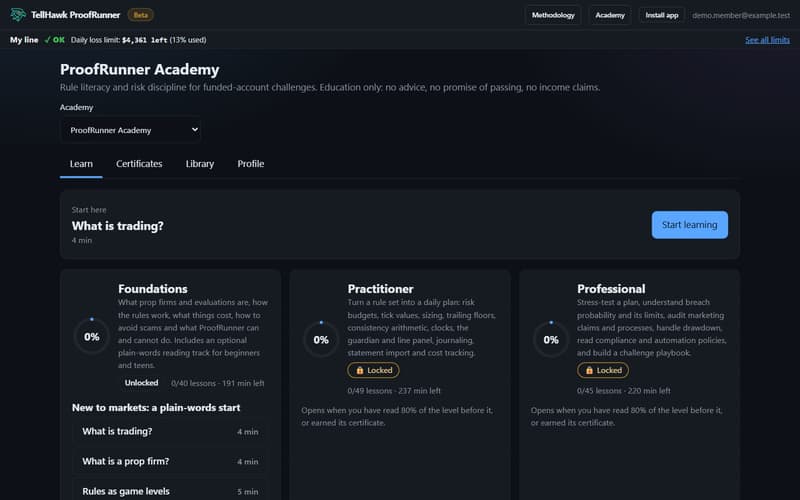
The Academy. Demo data: a made-up member and synthetic prices, not a real account or result.
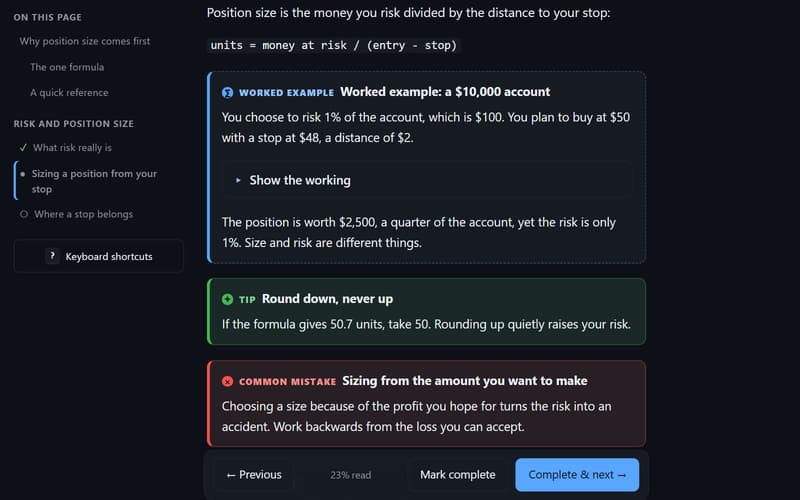
The reading view: a contents list that follows your place, callouts (key idea, worked example, tip, common mistake) and a section you expand to see the working. Notes and warnings are callout kinds too. Demo data: made-up content and a sample learner, not a real account or result.
Installable web app
Install ProofRunner on your phone or computer from your browser, and it opens like an app.
- Works on desktop and phone
- Alerts to a closed app are not available yet; Telegram and Discord cover that gap
Which firms are confirmed?
On 2026-10-03 we read Topstep, Lucid Trading and My Funded Futures from the firms' own public help pages and marked those fields confirmed. Apex, Tradeify and Take Profit Trader refused our automated reading, so their values are unverified: use them as a starting point and check the firm's own page. ATF is an empty placeholder because we could not identify the firm from the name alone.
Verify with the firm
Every rule set shows when it was last checked and a reminder to verify with the firm. Firms change their terms without notice, and your account is governed by the firm's current rules, not ours.
Platforms and automation
Prop firms differ on third-party tools, bots and copy trading, and some forbid them on funded accounts. Each rule set shows the firm's own wording where we found it. Read it before connecting anything.
Data coverage
The simulator uses daily history for US stocks and ETFs, major indices, BTC-USD and daily FX reference rates (EUR-USD, GBP-USD, USD-JPY). Spot-forex symbols such as EURUSD=X are not loaded, and futures history is not available yet; the simulator says so rather than substitute.
How it works
5 steps, from first look to result.
Request an invite
ProofRunner is open by invitation. Apply from the home page or write to us, and mention ProofRunner and what you trade.
Pick your firm and rules
Choose a rule set in the library, compare firms, or build your own, in challenge mode or funded mode.
Simulate
Replay a strategy against the rules on real history, and read the warnings before the pass rate. A pass rate from 20 trades is a hint, not a probability.
A simulator run: 58 trades, 1% passed from historical starts and 4% from resampled sequences, with the sample-size warning shown first. Demo data: a made-up member and synthetic prices, not a real account or result.
Connect a demo account or import a statement
Import a CSV or Excel statement, or connect a demo account where a connection exists. One FX/CFD platform connector is rolling out; futures platforms work by statement import.
Run it guarded, then track it
With Pro, check trades before you take them and get alerts. For any challenge, read the failure autopsy, and with Pro the journal and consistency report.
New to prop firms?
How prop firms work, and where ProofRunner fits.
A short, neutral explainer. It is not advice and promises no result.
What a prop firm is
You pay a fee to take an evaluation (a challenge) on a simulated account under the firm's rules: a profit target, a daily loss limit, a maximum drawdown, and sometimes consistency or news rules. Pass and you may be offered a funded account with a payout split. Break a rule and the account closes. Funded accounts are often still simulated at futures firms and live at some others. Firms earn largely from evaluation fees, there is no guarantee of passing, and firms and their terms differ and change, so read the firm's own rules.
How trades are placed
The firm gives you a login to a trading platform and you place orders there. Futures firms and FX/CFD firms each use a range of third-party platforms, and some have their own.
What ProofRunner is, and is not
ProofRunner is a safety and tracking layer around the platform you already use. It is not a replacement trading platform and it is not a broker. Free: the Challenge Simulator, a rule library for FX and futures firms (editable, with last-checked dates) and a failure autopsy. Pro features: a live guardian, a journal and consistency report, statement import and alerts. Orders sent from ProofRunner are demo-only.
Which platforms can it connect to?
FX/CFD platform connector
Rolling out
Built and tested; waiting on the platform vendor's approval of our app.
Second FX/CFD platform connector
Coming
A connector that runs on your own PC is built, not yet offered to customers.
Third FX/CFD platform bridge
Coming
A bridge that runs on your own PC is built, not yet offered to customers.
Futures platforms
Today, by statement import
Import a CSV or Excel statement (presets for common export layouts, or map the columns yourself) to track rules and consistency with Pro; there is no live connection.
Prop firms may restrict third-party tools or automation on funded accounts. Check your firm's rules before connecting anything.
Questions to ask your firm
- Which platforms and data feeds can I use, on the evaluation and on the funded account?
- Is the funded account simulated or live, and how and when are payouts made?
- Is the daily loss limit based on closed trades or on open equity, and when does the day reset?
- Is the drawdown fixed, trailing, or end-of-day, and what does it trail from?
- Are there consistency, news-trading or minimum-trading-day rules?
- Are third-party tools, trade copiers, journals or automation allowed? Is read-only tracking treated differently?
- What fees apply for retries, resets, data and platform, and what is refundable?
- When were these rules last changed, and where is the current version published?
Methodology
How ProofRunner models the rules, and what it gets wrong.
Plain English, including the limits. If you are about to pay for a funded challenge, read the limits before you read a pass rate.
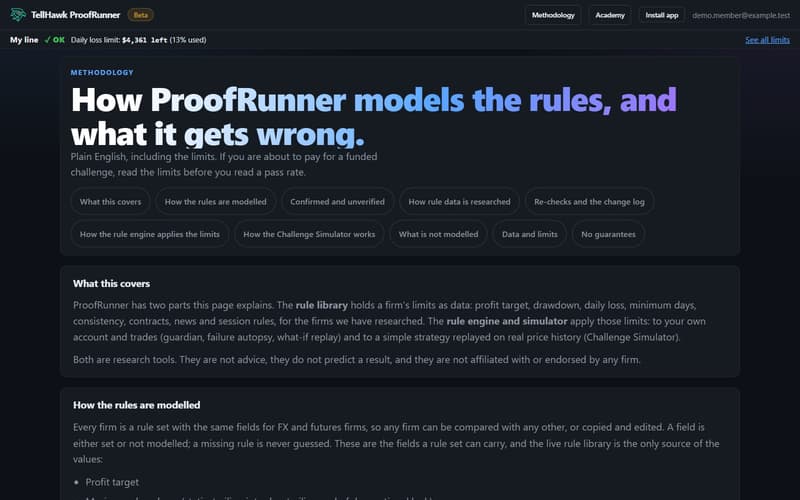
The Methodology page inside the app, which is also published on this page below. Demo data: a made-up member and synthetic prices, not a real account or result.
What this covers
ProofRunner has two parts this page explains. The rule library holds a firm's limits as data: profit target, drawdown, daily loss, minimum days, consistency, contracts, news and session rules, for the firms we have researched. The rule engine and simulator apply those limits: to your own account and trades (guardian, failure autopsy, what-if replay) and to a simple strategy replayed on real price history (Challenge Simulator).
Both are research tools. They are not advice, they do not predict a result, and they are not affiliated with or endorsed by any firm.
How the rules are modelled
Every firm is a rule set with the same fields for FX and futures firms, so any firm can be compared with any other, or copied and edited. A field is either set or not modelled; a missing rule is never guessed. These are the fields a rule set can carry, and the live rule library is the only source of the values:
- Profit target
- Maximum drawdown (static, trailing intraday, trailing end of day, optional lock)
- Daily loss (hard or soft)
- Minimum trading days
- Consistency (best day share)
- Maximum contracts and scaling plan
- News window
- Session (timezone, flatten-by, day roll)
- Time limit
Money limits are either an absolute amount or a percentage of the starting balance, converted from the starting balance of the account being checked.
Confirmed and unverified
Each field carries one of two marks, and the rule library shows the mark next to every value:
- Confirmed means the value was read from the firm's own public page on the date shown, with a link to that page.
- Unverified means we could not confirm it from the firm's own page. It may come from earlier notes, a typical challenge shape, or a source we could not check. Treat it as a starting point to check, not as the firm's terms. A field with no mark counts as unverified.
Even a confirmed value is a snapshot. Your account is governed by the firm's current rules, not ours, and firms change them, sometimes without notice. A rule set you build yourself is always shown as not verified, with the numbers exactly as you entered them. This is where each firm stands, counted from the rule data itself:
10 firms, 81 rule sets. 379 of 393 modelled fields are confirmed from a firm's own page; the rest are unverified.
| Firm | Kind | Rule sets | Confirmed fields | Last checked |
|---|---|---|---|---|
| Apex Trader Funding | futures | 12 | 56 of 56 | 2026-10-14 |
| ATF | futures | 1 | 0 of 1 (unverified) | 2026-10-14 |
| FTMO | forex | 3 | 14 of 14 | 2026-10-14 |
| FundedNext | forex | 4 | 15 of 15 | 2026-10-14 |
| Lucid Trading | futures | 21 | 97 of 101 | 2026-10-14 |
| My Funded Futures | futures | 7 | 45 of 45 | 2026-10-14 |
| Take Profit Trader | futures | 13 | 45 of 50 | 2026-10-14 |
| The5ers | forex | 1 | 0 of 4 (unverified) | never |
| Topstep | futures | 5 | 31 of 31 | 2026-10-14 |
| Tradeify | futures | 14 | 76 of 76 | 2026-10-14 |
How rule data is researched
- We read the firm's own public pages. Help centres, rule pages and terms. We record the page address and the date we read it next to each value.
- Where a firm's page would not load for us, we say so and mark the values unverified. We do not fill them in from memory or from a third-party summary and call them confirmed.
- We show the firm's own wording on bots, EAs and copy trading where we found it, because rules on automation differ between firms and change. Read the firm's page before connecting anything.
- No endorsements, no affiliate links. A rule set is a modelling aid. We do not rank firms, say which one to buy, or comment on how reliable any firm is.
Re-checks and the change log
We re-check firms by hand. There is no automatic monitor, so we do not promise a schedule. Instead the app shows how old each check is:
- Up to 60 days: shown as normal, with the date.
- Over 60 days: amber, "may be out of date, verify with the firm".
- Over 120 days: red, with the same warning.
- Never checked: shown as never verified against the firm's own pages.
Each firm has a version. When we publish a change the version goes up and a line is added to that firm's Changes list in the rule library: the field, the old and new value, the date and the firm page it came from. A re-check where nothing changed moves the "last verified" date without changing the version. Signed-in members can follow a firm and get an in-app notice when its rules change or its profile goes stale.
How the rule engine applies the limits
The same engine drives the guardian, the failure autopsy, the what-if replay and the consistency report. It makes one pass over your account history in time order and says where each rule stands.
Drawdown and trailing floors
- A static floor is fixed: starting balance minus the limit.
- A trailing intraday floor follows the highest equity seen, including open profit and loss. A trailing end-of-day floor follows the highest end-of-day equity, while a breach is still checked against live equity.
- Some firms lock the trailing floor. Where a rule set has a lock, the floor stops rising once it reaches the starting balance plus the stated offset.
Daily loss
- The loss is measured against the day's opening equity (realized plus open profit and loss), unless a rule set says the firm counts closed trades only.
- A hard limit fails the attempt when touched. A soft limit pauses you for the day and the attempt continues.
- The day rolls over at the firm's own clock (timezone and day-start time from the session rule), not at midnight UTC, where the profile says so.
Consistency
- The best single day is compared with a base: total net profit so far, or the profit target where the firm words it that way.
- It warns as the share approaches the limit and marks a breach above it. With no profit yet there is nothing to compare, and it says so.
News and session
- A news rule is either no new trades, or be flat, for a window before and after an event. It can only be checked when a news calendar is loaded; otherwise it says it cannot be checked.
- A flatten-by time fails the attempt when a trade is still open past the firm's cut-off (the strict reading; some firms only warn, and the rule pages say which). Contract limits count micros as a fraction of a full-size contract where the profile says so.
Equity points are only as dense as the account feed provides, so a breach between two points is not seen. Where there is no equity feed (an imported statement) the account is rebuilt from closed trades only, which ignores open profit and loss and is optimistic about drawdown.
How the Challenge Simulator works
- You pick a stored rule set. Choose a firm, then one of its rule sets (stage and account size) from the same library as the rule pages, forex and futures alike. Dollar limits become a percent of the account size, and trailing drawdown, a soft daily limit, the consistency rule, minimum days and the time limit carry over. Contract limits, news windows and the flat-by time are not modelled, because the simulator replays percent returns of a daily-bar strategy. Anything you type replaces the stored value.
- It runs a strategy on real daily prices. You pick a ticker, a history length (1, 3, 5 or 10 years) and a simple strategy: a moving-average crossover, an RSI rule, or a rule you build from indicators. It uses daily price bars only.
- It sizes every trade the same way. Each trade risks the percentage of current equity you choose if it loses one "R". One R is the price move you set as your stop distance or, if you leave it blank, the size of a typical losing trade in the sample.
- It replays the challenge from many start dates. A fresh challenge starts every 7 days across the history, using the trades that actually followed. This keeps the real order and clustering of trades. Because the windows overlap heavily, the page also reports how many roughly independent windows there really were.
- It resamples the trades. A second method reshuffles the trade sequence in short blocks, so streaks of wins or losses stay together, and keeps the waiting time that came before each trade. It runs up to 2,000 resampled challenges. The random seed is fixed on our side, so the same inputs always give the same answer and nobody can shop for a lucky seed.
- It reports passes and breaches. You see the share of runs that passed, the share that broke each rule (daily loss, drawdown, time limit, too few trading days) and how deep the account dipped. Where the two methods disagree by more than 20 points, it says so and tells you not to average them.
The evaluation window defaults to 90 days. That is a horizon you choose, not a rule taken from a firm. Each result carries a sample-confidence rating: unreliable below 10 trades; low below 30 trades or with fewer than 3 independent windows; moderate below 100 trades or 8 windows; fair above that. A pass rate from 20 trades is a hint, not a probability.
What is not modelled
The simulator is optimistic about losses
- Daily loss is worked out from closed trades, grouped by exit date (UTC), not from intraday equity. A firm also counts open-trade losses during the day, so real daily-loss breaches are more likely than shown.
- Drawdown and profit target use equity after each closed trade, with no floating profit or loss in between.
- Slippage, swap, commissions beyond the stated backtest costs and weekend gaps are not modelled.
The simulator applies only some of the rules
- It applies the profit target, maximum daily loss and maximum drawdown, plus an optional minimum number of trading days. Its drawdown floor is static (set from the starting balance) unless you switch on a trailing end-of-day floor, which locks once it reaches the starting balance. You can also switch on a consistency limit (best day share), a daily-loss pause instead of a failure, and a second phase.
- Trailing intraday floors, contract limits and news windows are in the rule library and the rule engine above, but the simulator does not apply them.
- Leverage is not checked. If a position works out to many times your account, check your firm's leverage limit yourself.
- Futures firms are not simulated yet. Futures price history licensed for customer use is not available yet, so the simulator will not run a futures firm's rule set. It says so instead of substituting other data. For futures, the guardian, failure autopsy and journal work from your own account feed or a statement import.
- Anything a profile does not hold. A platform restriction, a payout condition or a rule added since the last check is not checked. Payout and automation notes are the firm's wording, not a rule the engine enforces.
Data and limits
- Coverage is limited. US stocks and ETFs, major indices, BTC-USD and daily FX reference rates. Spot-forex symbols are not loaded. FX runs use one reference-rate close per day, with no intraday range and no dealer spread. Market prices come from a third-party provider and can be delayed or wrong.
- Small samples are flagged, and a sample with no losing trades is reported as optimistic and unreliable. Resampling cannot create information that is not in the trades.
No guarantees
Past or simulated results do not predict challenge outcomes. A simulation shows what would have happened to one strategy on past prices under simplified rules, and a real challenge has costs, timing and rules this page says we do not capture. ProofRunner is a research tool, not advice, and nothing here promises a pass, a payout or a profit. Always verify the rules with the firm before you pay for a challenge.
Report an error: email hello@tellhawk.com with the firm, the rule set, the field and a link to the firm's page that says otherwise. If we change it, the fix shows up in that firm's change log with the date and source.
Limits
What to know before you use it.
- Access is by invitation only. The app sits behind a sign-in for invited members.
- The simulator replays history. It does not predict whether you would pass a real challenge, and nothing here promises a pass, a payout, a profit or any result.
- Rule sets are a snapshot. Only fields marked confirmed were read from the firm's own page, on the date shown. Always verify with the firm.
- Futures price history is not available yet, so the Challenge Simulator cannot run futures rule sets. Futures accounts are tracked by statement import, with no live connection.
- One FX/CFD platform connector is rolling out and not generally available yet. Two more FX/CFD platform connectors are coming (not available): local connectors are built but not yet offered to customers. A read-only futures platform add-on is also coming; it has been tested against a simulator only.
- Behaviour flags, fit comparisons and cost totals describe your own records. They are not advice or a prediction, and they are only as complete as what you imported or entered.
- Orders go to demo accounts; live order placement is off by default and unverified. Starter strategies only propose an order, and you send it.
- Prop firms may restrict third-party tools or automation. You stay responsible for your own trading and for following your firm's rules. ProofRunner is not investment advice, and it is not affiliated with or endorsed by any prop firm, broker or trading platform.
Pricing
What it costs.
Free
- Challenge Simulator (futures history not available yet), including from your own trades
- The rule library: FX and futures firms, editable, with a change log you can follow
- Failure autopsy with what-if replay
- Behaviour flags and a cost and ROI tracker (up to 50 records)
- Statement import (CSV or Excel)
- Starter-strategy signals (they only propose an order)
- Up to 3 demo accounts
- A small taster of the Academy
ProofRunner Pro
- Live guardian and trade checker
- Journal and consistency report, with CSV export
- Alerts: in-app, browser, Telegram, Discord
- Where is my line: live room under every rule
- Demo-only orders
- More accounts than the free 3
- No plan limit on cost and ROI records
- The full Academy: every lesson, lab, exam and certificate
The Pro features have no published price yet. Invited members see the plan and its price inside the app before any payment, and nothing is charged without a checkout you start yourself. Everything is free during the beta.
Full plan comparison on the pricing page.
FAQ
Common questions.
What is a prop firm?
A proprietary trading firm that sells evaluations. You pay a fee, trade a simulated account under rules such as a profit target, a daily loss limit and a maximum drawdown, and may be offered a funded account with a payout split if you pass. Breaking a rule closes the account. Passing is not guaranteed, terms differ between firms and change, and none of this is advice, so read the firm's own rules.
Can ProofRunner replace my trading platform?
No. ProofRunner is not a trading platform or a broker. It is a safety and tracking layer around the platform your firm gives you, and orders sent from it are demo-only.
Will ProofRunner work with my firm's platform?
It depends on the platform. One FX/CFD platform connector is rolling out, waiting on the vendor's approval. Two more FX/CFD platform connectors are coming: they are built but not yet offered to customers. For futures platforms you can import statements today (a Pro feature). There is no live connection to futures platforms yet.
Do prop firms allow tools like this?
It varies by firm, and some restrict third-party tools or automation on funded accounts. Check your firm's rules, or ask them, before connecting anything. ProofRunner is not affiliated with or endorsed by any prop firm.
Related
Works well with.
ProofRunner
For funded-challenge traders: load a firm's rules, simulate your strategy against them, and see how close you are to each limit. Invitation only.
Research only, not investment advice. Backtests replay history and do not predict the future.