
Products / TellHawk Trader
Charting and execution
Chart it, check the risk, then place the order.
TellHawk Trader is the workstation for acting on your research: charts with insider and institutional filings plotted on the price history, a trade journal, and order placement at your brokerage that passes a risk check first.
- Risk check before every order
- Paper and live trading
- Trade journal with calendar
What it is
TellHawk Trader, explained.
TellHawk Trader is a separate, lighter product from the Terminal, built around the moment you act. It combines charting, a watchlist, a research panel, risk limits, order placement through a connected brokerage, and a journal of what you did.
Every order, paper or live, goes through the same pre-trade risk check. There is no setting that turns it off.
Who it is for
Self-directed traders
You place your own trades and want charts, research and risk limits in one place instead of five tabs.
People learning with paper money
Connect a paper account first, see how orders and the journal behave, and switch to live only when you choose to.
Traders who keep score
The journal, calendar and tax-lot export are there to show what you actually did, not what you remember.
Key features
What it does today.
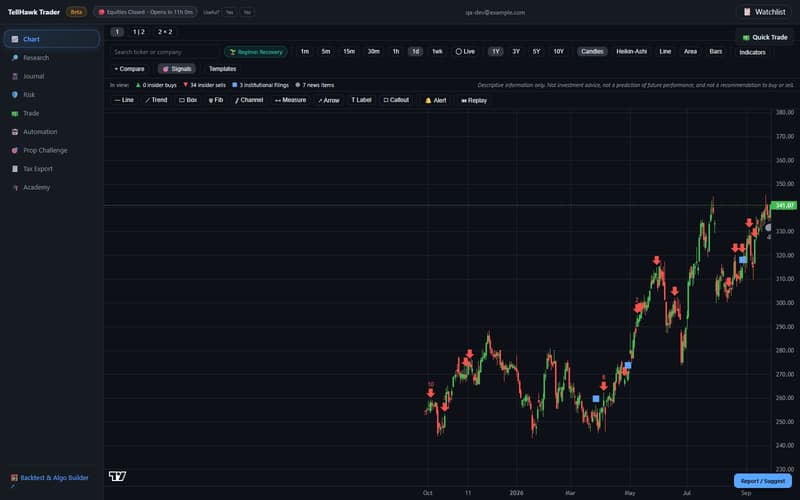
Charting with filing signals on the candles
Candles, Heikin-Ashi, bars, lines and areas with a standard indicator set, drawing tools and Bar Replay, plus markers for insider and institutional filings placed on the price history.
- SMA/EMA, RSI, MACD, Bollinger Bands, VWAP and more
- Trendlines, Fibonacci retracement, parallel channels and price alerts
- Click a price on the chart to pre-fill the order ticket (you still confirm it)
Research, right where you trade
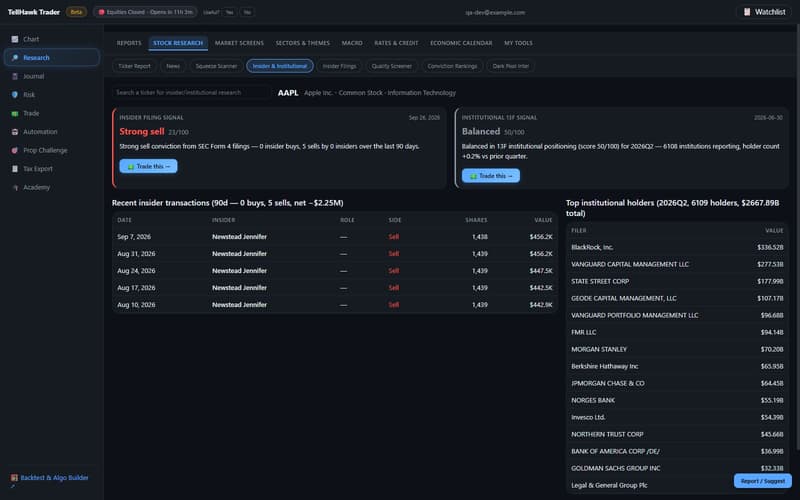
The Terminal's stock-research tools live in Trader's Research tab: ticker report, news, squeeze scanner, quality screener, conviction rankings, dark-pool intel and the insider and institutional signal cards, each with a Trade this action.
- The Research tab is part of Trader Pro; Free accounts get a live Squeeze Scanner preview there
- Signals describe what the filings show; they are not recommendations
Risk limits that gate every order
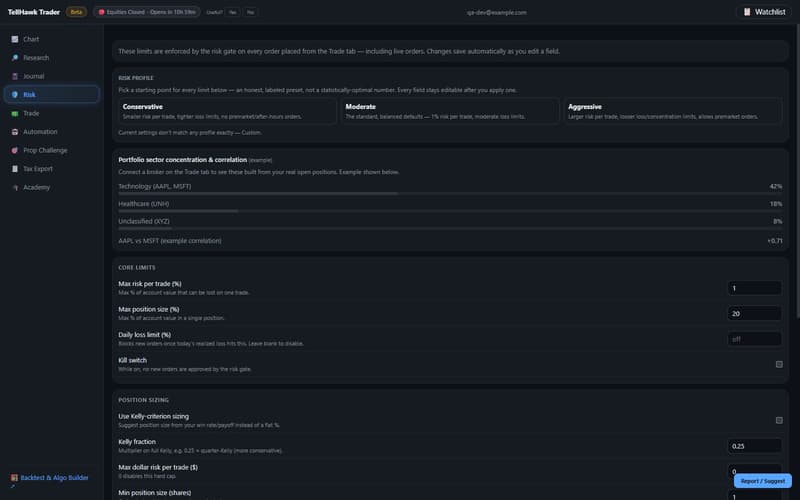
Set per-trade risk, position size, daily, weekly and monthly loss limits, a kill switch, a minimum risk/reward and no-trade windows around the open and close. Start from a Conservative, Moderate or Aggressive preset and edit any field.
- An order with no stop-loss fails the risk check
- Sector concentration and correlation warnings on the ticket
- The check runs for paper and live orders alike
Paper or live, with a confirmation step
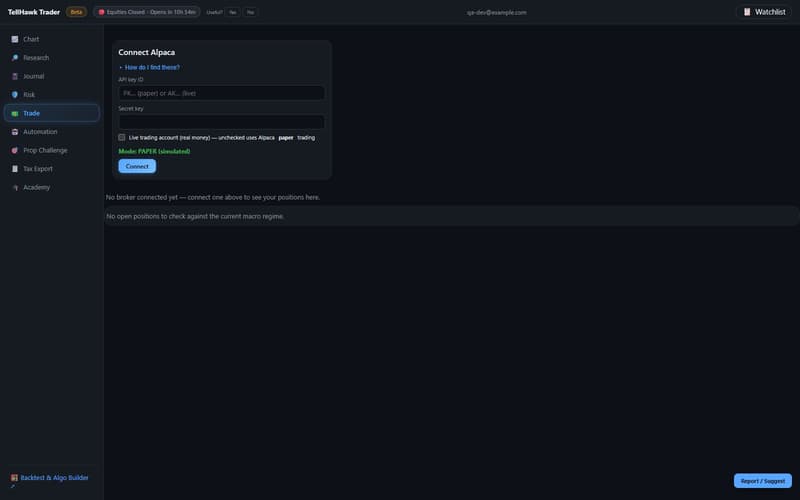
Connect a brokerage account with its API keys (stored encrypted on the server), choose paper or live, and place limit or trailing-stop orders. Nothing is sent until you confirm in a review window.
- Position sizing from your risk percentage and stop distance
- Modify and cancel open orders; close positions with an armed second click
- Broker order placement currently supports one brokerage, with more planned
A journal that fills itself in
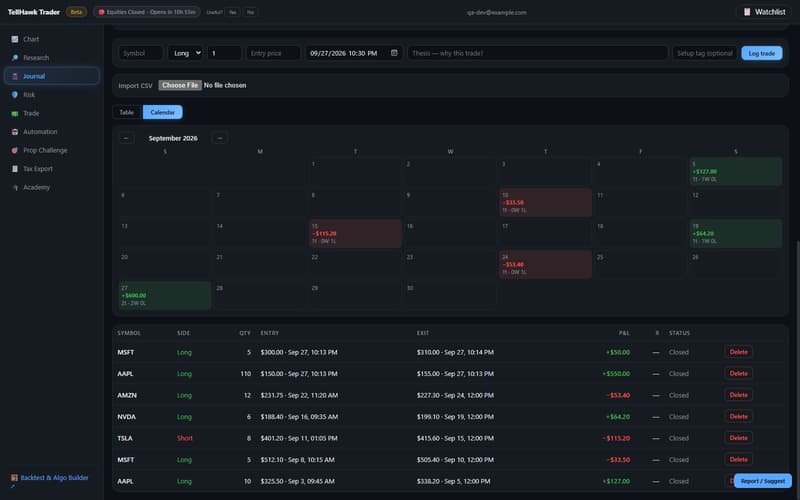
Orders placed through Trader are logged to the journal. Add trades by hand, import a CSV (Pro), and read your results as a calendar coloured by daily profit and loss.
- Wash-sale warning on the ticket when you re-enter a recent loser
- Tax-lot and wash-sale export on Pro (a simplified model, not tax advice)
- A free Edge Report checks for cherry-picked results, entirely in your browser
Automation
Take a strategy that passed the four-lens validation gate in the Strategy Lab or BaaS and run it against paper trading. A stop-loss is required, you can pause or stop it at any time, and every automated order goes through the same risk check. Automated strategies run on paper only.
Academy
Lessons on risk, sizing and trading basics, bundled with the app.
Watchlist and alerts
8 tickers on Free, unlimited on Pro, with price alerts on the chart.
How it works
5 steps, from first look to result.
A real screen capture of TellHawk Trader.
Chart a symbol
Open the chart, add indicators, and look at where insiders and institutions filed relative to price.
Read the research
Switch to Research for the filing signals on the same ticker, and use Trade this to open the order ticket.
Set your limits
Pick a risk profile and adjust the per-trade, daily and sector limits before you place anything.
Connect and place
Connect a paper account, review the order in the confirmation window, and send it.
Review the journal
Look at the calendar and closed trades to see how the week actually went.
Which tool do I use?
Four tools, four different jobs.
They overlap on purpose, but each answers a different question. Here is how they differ and how they fit together.
Research workbench
Strategy Lab
- Best for
- Deep research on a portfolio-level idea.
- How it tests
- Replays a whole universe of stocks through history one rebalance at a time, showing each decision only what was public that day, net of costs.
- You get
- Nine evidence tests, a luck check, a deflated Sharpe and a stress test.
- Does it trade?
- Never. It tests ideas; it places no orders.
- Access
- Inside TellHawk Terminal. Free: 5 backtests a day.
Quick check
TellHawk BaaS
- Best for
- A fast check of a simple idea on one symbol.
- How it tests
- Walk-forward folds for a moving-average crossover, RSI or rule-builder strategy on a single ticker.
- You get
- Fold-by-fold scores and the four-lens validation gate.
- Does it trade?
- Never. A passed result can be sent to Trader.
- Access
- Sign-in required. Free: 5 backtests a day. It is also the engine the Marketplace uses to re-test a strategy when it is published.
Find and share
TellHawk Strategy Marketplace
- Best for
- Finding or sharing a strategy that has already passed the gate.
- How it tests
- Every listing was re-run on the server through the same walk-forward backtest and gate before it was listed.
- You get
- Profit factor, Sharpe, win rate, folds passed and the gate result for each listing.
- Does it trade?
- Never. Run in BaaS and Deploy to Trader open those tools with the strategy pre-filled.
- Access
- Free to browse and to publish. Paid listings are priced by their authors.
Run it on your account · you are here
TellHawk Trader
- Best for
- Running a validated strategy on your own account.
- How it tests
- Automation runs a gate-passed moving-average, RSI or rule-builder strategy on a connected paper account with the supported brokerage. A stop-loss is required and every order passes the same pre-trade risk check.
- You get
- Pause or stop at any time; every run is logged.
- Does it trade?
- Automation trades on paper only. Live orders are placed by you, with a confirmation step.
- Access
- Free and Pro plans. One brokerage is supported today.
- Research in the Lab, or check fast in BaaS
- Find or publish it in the Marketplace
- Run it in Trader, on paper
The route works for single-ticker moving-average, RSI and rule-builder strategies, the types the server can re-run and verify. A Lab strategy is a portfolio-level pipeline, so it is not published or deployed directly: describe the same idea as one of those types to take it through BaaS, the Marketplace and Trader. A backtest replays history and does not predict the future.
Limits
What to know before you use it.
- Trader is not a research terminal and not a signal service. Signals describe the data; they are not recommendations to buy or sell.
- Automated strategies run against paper trading only. Live orders are placed by you, one at a time, through the confirmation step.
- Broker order placement currently supports one brokerage; other brokers are planned and not available.
- Chart data is third-party market data. It is not guaranteed to be real-time or error-free, so check anything important with your broker before you trade.
- Backtests replay history after costs and do not predict future results. Nothing here is investment, tax or legal advice.
Pricing
Start free.
Everything is free during the beta.
Free
- Charts and an 8-ticker watchlist
- Manual trade journal
- Backtesting and the algo/rule builder (via the Strategy Lab), 5 runs a day
- Paper and live trading, with one connected brokerage
Pro
- Everything in Free; watchlist and backtesting unlimited
- Journal CSV import
- Tax-lot and wash-sale export
- Paper and live trading
- Full TellHawk Terminal research included, so no separate Terminal subscription is needed
New Pro subscribers get a 14-day free trial. Trader is a closed, invite-only beta and everything is free during it; these are the planned plans once it is out of beta. To request access, write to hello@tellhawk.com or apply below. A paid Trader plan already includes the full Terminal research suite.
Full plan comparison on the pricing page.
Related
Works well with.
TellHawk Trader
Charting, a watchlist, a trade journal and risk-checked paper and live order placement at your brokerage.
Research only, not investment advice. Backtests replay history and do not predict the future.