
Products / TellHawk BaaS
Backtest-as-a-Service
Backtest a strategy the way it would have to survive.
BaaS (Backtest-as-a-Service) takes one ticker and one strategy, replays it through years of history in walk-forward folds, scores every fold against buy-and-hold and a random-entry baseline, and runs a four-lens validation gate.
- Walk-forward folds, scored one by one
- Four-lens validation gate
- Sign-in required, free daily runs
What it is
TellHawk BaaS, explained.
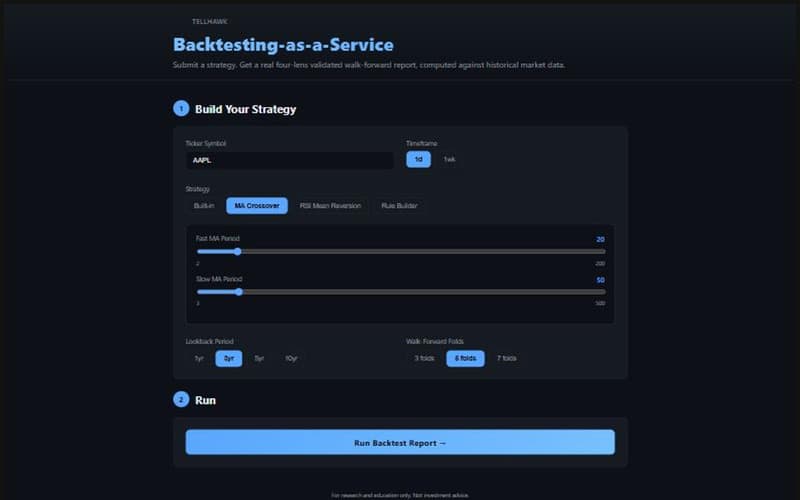
BaaS is the standalone backtesting engine behind the Strategy Lab's single-ticker strategies. You choose a ticker, a timeframe (daily or weekly), a lookback (1, 3, 5 or 10 years), a number of walk-forward folds (3, 5 or 7) and a strategy, then run it. The report scores each fold separately instead of showing one flattering overall curve.
A strategy that passes the validation gate can be sent in one click to TellHawk Trader's Automation tab for paper trading. It is re-verified on the server there before anything runs.
Who it is for
Strategy builders
You have a moving-average, RSI or indicator-threshold idea and want to see how it behaves fold by fold.
Skeptics
You want to know whether a result beats random entries and buy-and-hold, and whether it only worked in one market regime.
Traders moving to automation
You want a validated spec you can hand to paper trading without retyping it.
Key features
What it does today.
Four ways to define a strategy
Pick a built-in strategy, a moving-average crossover (fast and slow periods), an RSI mean-reversion rule (oversold and overbought levels), or build up to five entry conditions from nine indicators.
- Rule builder indicators: SMA, EMA, RSI, MACD histogram, ATR, Stochastic %K, OBV, VWAP and ADX
- Conditions use greater/less than or crosses above/below a fixed value, ANDed together
- Exit mirrors entry with the opposite comparison; the generated config is shown before you run
A report that shows the folds, not just the total
Each fold reports its regime, return against buy-and-hold, trades, win rate, profit factor and maximum drawdown. Across folds you see how many were profitable, how many beat random entries and buy-and-hold, and a warning if the strategy only worked in one regime.
- Profit factor and win rate are pooled over every trade, so empty folds do not distort them
- Profit factor shows n/a, not a made-up number, when there were no losing trades
- Hypothetical results are labelled as such on the report
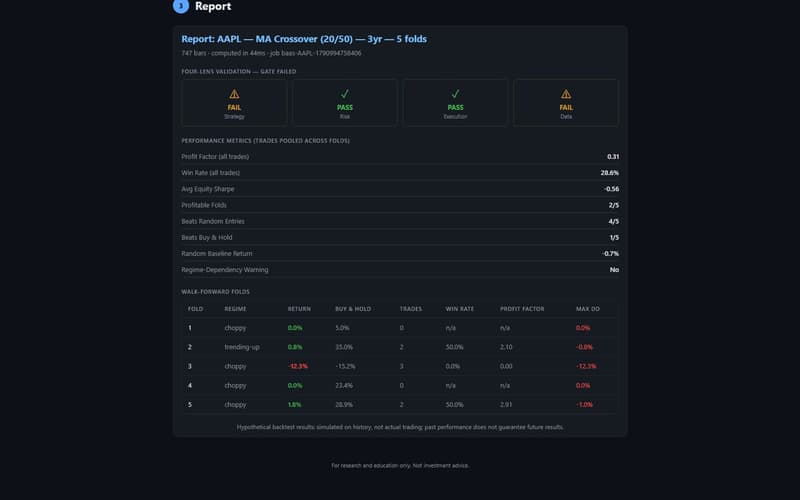
A real run (AAPL, 20/50 moving-average crossover, 3 years, 5 folds). This one failed the gate, and the report says so.
The four-lens validation gate
After the folds, the strategy is judged through four lenses: strategy, risk, execution and data. The report shows which passed and why the others did not.
- The same gate is used by the Strategy Lab and the Marketplace
- Only a passed run offers the deploy button
Deploy to paper trading
A passed MA-crossover, RSI or rule-builder result opens TellHawk Trader with the exact spec pre-filled. Trader re-verifies it server-side and asks for a stop-loss before it runs on paper.
API access
BaaS is also callable with an API key; those calls count against the key's plan limits.
Strategies from the Marketplace
Any Marketplace listing can be opened in BaaS with its parameters pre-filled.
How it works
4 steps, from first look to result.
A real screen capture of TellHawk BaaS.
Sign in and choose a ticker
BaaS sits behind sign-in. Pick a ticker and a daily or weekly timeframe.
Define the strategy
Choose a built-in, MA crossover, RSI or rule-builder strategy and set its parameters.
Set lookback and folds
Choose 1, 3, 5 or 10 years and 3, 5 or 7 walk-forward folds, then run.
Read the report
Check the gate result, the pooled metrics and every fold. If the gate passes, deploy to paper trading from the report.
A real run (AAPL, 20/50 moving-average crossover, 3 years, 5 folds). This one failed the gate, and the report says so.
Which tool do I use?
Four tools, four different jobs.
They overlap on purpose, but each answers a different question. Here is how they differ and how they fit together.
Research workbench
Strategy Lab
- Best for
- Deep research on a portfolio-level idea.
- How it tests
- Replays a whole universe of stocks through history one rebalance at a time, showing each decision only what was public that day, net of costs.
- You get
- Nine evidence tests, a luck check, a deflated Sharpe and a stress test.
- Does it trade?
- Never. It tests ideas; it places no orders.
- Access
- Inside TellHawk Terminal. Free: 5 backtests a day.
Quick check · you are here
TellHawk BaaS
- Best for
- A fast check of a simple idea on one symbol.
- How it tests
- Walk-forward folds for a moving-average crossover, RSI or rule-builder strategy on a single ticker.
- You get
- Fold-by-fold scores and the four-lens validation gate.
- Does it trade?
- Never. A passed result can be sent to Trader.
- Access
- Sign-in required. Free: 5 backtests a day. It is also the engine the Marketplace uses to re-test a strategy when it is published.
Find and share
TellHawk Strategy Marketplace
- Best for
- Finding or sharing a strategy that has already passed the gate.
- How it tests
- Every listing was re-run on the server through the same walk-forward backtest and gate before it was listed.
- You get
- Profit factor, Sharpe, win rate, folds passed and the gate result for each listing.
- Does it trade?
- Never. Run in BaaS and Deploy to Trader open those tools with the strategy pre-filled.
- Access
- Free to browse and to publish. Paid listings are priced by their authors.
Run it on your account
TellHawk Trader
- Best for
- Running a validated strategy on your own account.
- How it tests
- Automation runs a gate-passed moving-average, RSI or rule-builder strategy on a connected paper account with the supported brokerage. A stop-loss is required and every order passes the same pre-trade risk check.
- You get
- Pause or stop at any time; every run is logged.
- Does it trade?
- Automation trades on paper only. Live orders are placed by you, with a confirmation step.
- Access
- Free and Pro plans. One brokerage is supported today.
- Research in the Lab, or check fast in BaaS
- Find or publish it in the Marketplace
- Run it in Trader, on paper
The route works for single-ticker moving-average, RSI and rule-builder strategies, the types the server can re-run and verify. A Lab strategy is a portfolio-level pipeline, so it is not published or deployed directly: describe the same idea as one of those types to take it through BaaS, the Marketplace and Trader. A backtest replays history and does not predict the future.
Limits
What to know before you use it.
- BaaS requires sign-in. It is not an open public site, and it does not offer raw data downloads: you get the report.
- Free accounts get 5 backtests a day (resetting at midnight UTC); Trader Pro is unlimited.
- Results are hypothetical: simulated on history, not actual trading. Past performance does not guarantee future results.
- Only MA-crossover, RSI and rule-builder strategies can be re-verified server-side, so those are the types that can be deployed. Built-in strategies run in BaaS but are not deployable.
- Automated deployment runs against paper trading only.
Pricing
Start free.
Everything is free during the beta.
Free
- 5 backtests a day, resetting at midnight UTC
- All four strategy types, 3/5/7 folds, up to 10 years
- Validation gate and deploy to paper trading
Trader Pro
- Unlimited backtests
- Everything else in TellHawk Trader Pro, including full Terminal research
Sign in with your TellHawk account. BaaS is currently open to beta testers only, on the same invite list as TellHawk Trader; everything is free during the beta and these are the planned limits afterwards. API-key callers are limited by their key's plan instead.
Full plan comparison on the pricing page.
Related
Works well with.
TellHawk BaaS
A dedicated backtesting engine: walk-forward folds, a four-lens validation gate and one-click deploy to paper trading.
Research only, not investment advice. Backtests replay history and do not predict the future.